

Fire TV users are reporting a new bug that is preventing Downloader and other applications from receiving permission to install apps from unknown sources.
The issue was first discovered and reported by Elias Saba of AFTVNews, who found that some devices running the latest versions of Fire OS 7 and Fire OS 8 are no longer displaying all compatible applications within the Install Unknown Apps menu.
This is an important setting for anyone who uses Downloader or another application to sideload APKs that aren’t available within the Amazon Appstore.
Normally, Fire TV owners can navigate to Settings > My Fire TV > Developer Options > Install Unknown Apps and enable permission for Downloader or another application. (This is often referred to as “jailbreaking“.)
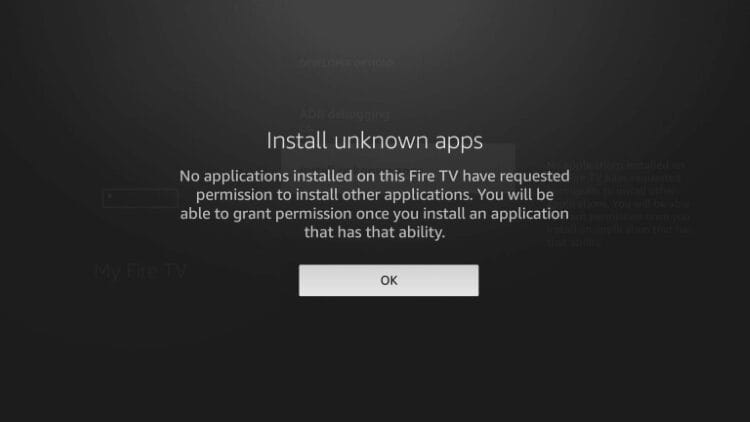
However, those affected by the latest bug are finding that Downloader and other compatible apps simply don’t appear in this list.
Without the ability to enable this permission, Downloader cannot launch the Fire TV package installer to install APK files.
Which Fire TV Devices Are Affected?
According to AFTVNews, the issue is present in the following software versions:
- Fire OS 7: 7.7.1.6 (5665)
- Fire OS 8: 8.1.8.2 (3811)
It is important to point out that simply running one of these software versions does not mean your device will experience the problem.
We attempted to replicate this issue on our own Fire TV device (Fire TV Stick 4K Max), and Downloader continues to appear within the Install Unknown Apps menu as expected.
However, if you do have this bug on your device, you will likely see an image similar to the one below.
Reports from other Fire TV owners are similarly inconsistent, which suggests the problem is somewhat random and does not affect every device receiving these updates.
AFTVNews found that the problem appears to be related to how Fire OS generates the list of applications capable of requesting installation permission. On affected devices, the settings page may finish loading before every compatible application has been added to the list.
This could also explain why the problem appears more frequently on certain Fire TV models than others.
Unfortunately, there doesn’t appear to be a reliable fix at this time, and this is something Amazon will likely need to correct with another software update.
Another Fire TV Sideloading Headache
Over the past few years, Amazon has restricted numerous Fire TV customization features, limited ADB functionality, blocked various workarounds, and transitioned newer Fire TV Sticks to its Linux-based Vega OS.
Unlike Fire OS, Vega OS is not based on Android and does not support traditional Android APK files. This means popular sideloaded applications designed for Android cannot simply be installed on Vega-powered Fire TV devices.
Amazon has already confirmed that future Fire TV Sticks will use Vega OS, leaving the remaining Android-based Fire TV models on borrowed time.
This latest bug isn’t necessarily evidence that Amazon is intentionally disabling sideloading on existing Fire OS devices, but it certainly doesn’t inspire confidence for those who rely on this functionality.
Is it Time to Move Away From Fire TV?
This is exactly why we continue recommending Android TV and Google TV devices over Amazon’s Fire TV lineup for those who want more control over their streaming device.
Devices such as the onn 4K Pro provide a true Google TV operating system with the ability to sideload Android applications without dealing with Amazon’s increasing restrictions.
The onn 4K Pro also provides 32 GB of internal storage, USB connectivity, Ethernet, and other features that make it one of the best alternatives to the Fire TV Stick.
We will keep an eye on this issue and update this article if Amazon releases a fix.
Are you experiencing this problem on your Firestick or Fire TV? Let us know what device and Fire OS version you’re using in the comments below.
Be sure to stay up-to-date with the latest streaming news, reviews, tips, and more by following the TROYPOINT Advisor with updates weekly.
The post New Fire TV Bug Blocks Downloader and “Unknown Apps” Setting appeared first on TROYPOINT: Tech Tutorials On Firestick, Kodi, Android TV Box, VPN, IPTV, Streaming, & More.